腾讯云EO可以查看一些指标信息,但是更加详细的信息需要我们下载离线日志自行分析。

获取日志下载链接

腾讯云会将日志打包为.gz格式,解压后文件会包含多行,每一行都是一个JSON格式的数据,对应一条EO的请求日志,日志格式可以参考腾讯云文档

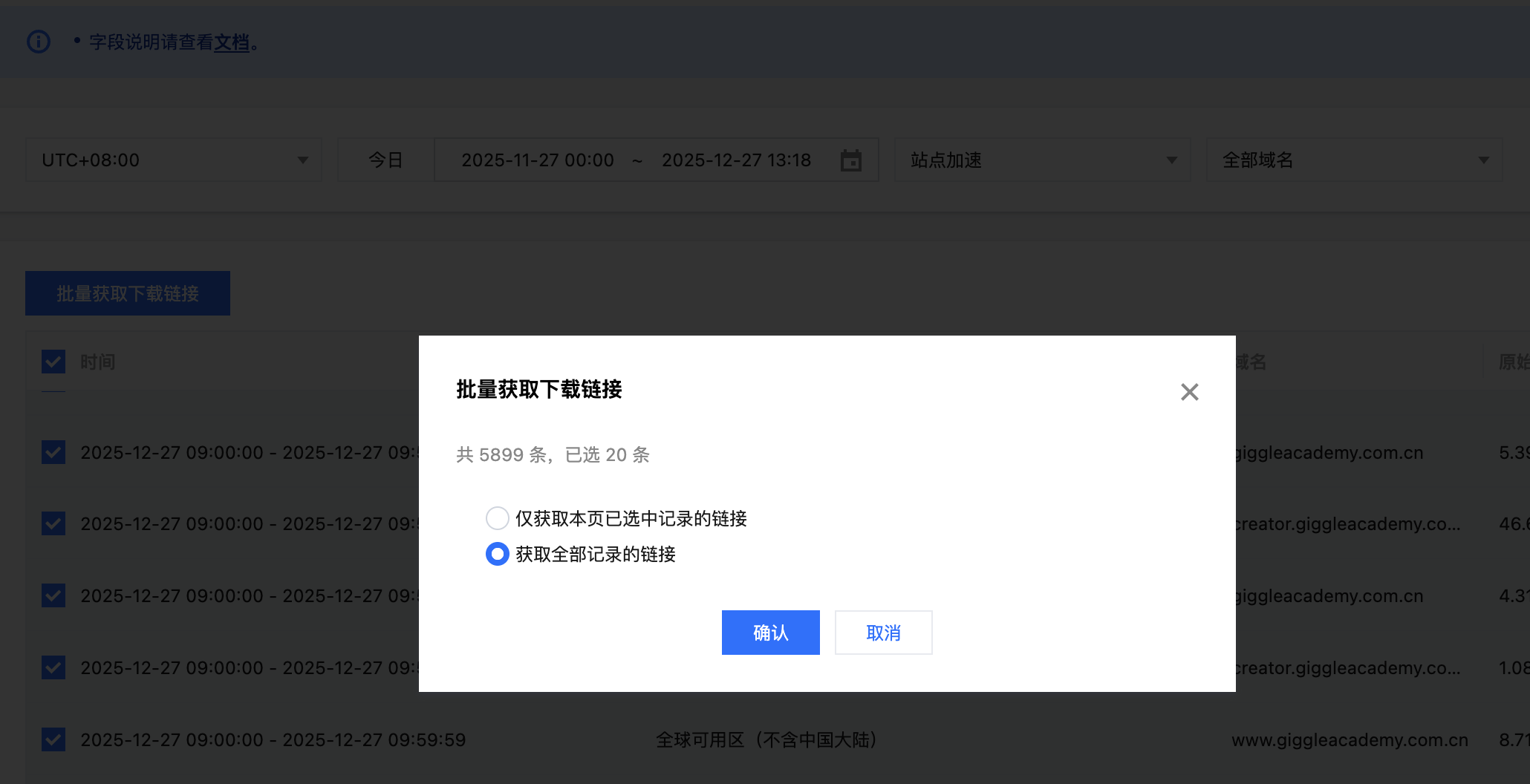
我们可以批量获取最近一个月的日志下载链接

之后复制所有链接并保存到urls.txt文件中。

启动Elasticsearch集群

我们参考官方文档使用docker来启动集群,首先下载.envdocker-compose.yml,之后在.env文件中设置es和kibana的密码都是123456,然后设置STACK_VERSION=9.2.3。考虑到数据量比较大,可以提高容器的内存大小,我这里设置了一台8G。

1
2
3
4
5
6
7
8
9
10
11
12
13
14
15
16
17
18
19
20
21
22
23
24
25
26
# Password for the 'elastic' user (at least 6 characters)
ELASTIC_PASSWORD=123456

# Password for the 'kibana_system' user (at least 6 characters)
KIBANA_PASSWORD=123456

# Version of Elastic products
STACK_VERSION=9.2.3

# Set the cluster name
CLUSTER_NAME=elasticsearch-cluster

# Set to 'basic' or 'trial' to automatically start the 30-day trial
LICENSE=basic

# Port to expose Elasticsearch HTTP API to the host
ES_PORT=9200

# Port to expose Kibana to the host
KIBANA_PORT=5601

# Increase or decrease based on the available host memory (in bytes)
MEM_LIMIT=8589934592

# Project namespace (defaults to the current folder name if not set)
COMPOSE_PROJECT_NAME=elasticsearch-project

设置好了之后使用命令docker-compose up -d启动ES集群。

之后可以通过http://127.0.0.1:5601访问kibana,用户名elastic,密码123456。

写入日志

使用如下的代码下载解析日志,并保存到ES中

1
2
3
4
5
6
7
8
9
10
11
12
13
14
15
16
17
18
19
20
21
22
23
24
25
26
27
28
29
30
31
32
33
34
35
36
37
38
39
40
41
42
43
44
45
46
47
48
49
50
51
52
53
54
55
56
57
58
59
60
61
62
63
64
65
66
67
68
69
70
71
72
73
74
75
76
77
import gzip
import json
import os
from datetime import datetime
from urllib.parse import urlparse

import requests
from elasticsearch import Elasticsearch, helpers

ES_URL = "https://localhost:9200"
ES_USER = "elastic"
ES_PASSWORD = "123456"
INDEX_NAME = "eo_logs"
DOWNLOAD_DIR = "downloaded_logs"

es = Elasticsearch([ES_URL], basic_auth=(ES_USER, ES_PASSWORD), verify_certs=False, ssl_show_warn=False)
os.makedirs(DOWNLOAD_DIR, exist_ok=True)


def download_file(url):
filename = os.path.basename(urlparse(url).path)
filepath = os.path.join(DOWNLOAD_DIR, filename)
if os.path.exists(filepath):
print(f"文件已存在: {filename}")
return filepath
print(f"下载: {filename}")
response = requests.get(url, stream=True, timeout=300)
with open(filepath, 'wb') as f:
for chunk in response.iter_content(chunk_size=8192):
if chunk:
f.write(chunk)
return filepath


def parse_gz(filepath):
logs = []
print(f"解析: {os.path.basename(filepath)}")
with gzip.open(filepath, 'rt', encoding='utf-8') as f:
for line in f:
line = line.strip()
if line:
log = json.loads(line)
log['_source_file'] = os.path.basename(filepath)
log['_import_time'] = datetime.utcnow().isoformat()
logs.append(log)

print(f"解析完成: {len(logs)} 条")
return logs


def save_to_es(logs):
if not logs:
return
print(f"保存 {len(logs)} 条到 ES")
actions = [{"_index": INDEX_NAME, "_source": log} for log in logs]
success, _ = helpers.bulk(es, actions, chunk_size=1000, request_timeout=60)
print(f"保存完成: {success} 条")


def process_url(url):
filepath = download_file(url)
logs = parse_gz(filepath)
save_to_es(logs)


def main():
with open("urls.txt", 'r') as f:
urls = [line.strip() for line in f if line.strip()]
print(f"开始处理 {len(urls)} 个文件\n")
for i, url in enumerate(urls, 1):
print(f"\n[{i}/{len(urls)}]")
process_url(url)
print("\n处理完成!")


if __name__ == "__main__":
main()

执行如上代码,就能够下载日志并保存到ES了(这会花费比较多的时间,我这里花费了100多分钟)。

分析日志

数据索引完毕之后,我们可以查看索引信息

1
2
~ curl 'https://127.0.0.1:9200/eo_logs/_count' --header 'Authorization: Basic ZWxhc3RpYzo9dk5Cc0QwSTNZRWFPa2RoZFFhZg==' -k
{"count":31398691,"_shards":{"total":1,"successful":1,"skipped":0,"failed":0}}%

可以看到一共索引了3000多万条数据,我们还可以查看索引的mapping和详细信息如下

1
2
3
4
5
6
7
8
9
10
11
12
13
14
15
16
17
18
19
20
21
22
23
24
25
26
27
28
29
30
31
32
33
34
35
36
37
38
39
40
41
42
43
44
45
46
47
48
49
50
51
52
53
54
55
56
57
58
59
60
61
62
63
64
65
66
67
68
69
70
71
72
73
74
75
76
77
78
79
80
81
82
83
84
85
86
87
88
89
90
91
92
93
94
95
96
97
98
99
100
101
102
103
104
105
106
107
108
109
110
111
112
113
114
115
116
117
118
119
120
121
122
123
124
125
126
127
128
129
130
131
132
133
134
135
136
137
138
139
140
141
142
143
144
145
146
147
148
149
150
151
152
153
154
155
156
157
158
159
160
161
162
163
164
165
166
167
168
169
170
171
172
173
174
175
176
177
178
179
180
181
182
183
184
185
186
187
188
189
190
191
192
193
194
195
196
197
198
199
200
201
202
203
204
205
206
207
208
209
210
211
212
213
214
215
216
217
218
219
220
221
222
223
224
225
226
227
228
229
230
231
232
233
234
235
236
237
238
{
"eo_logs": {
"aliases": {},
"mappings": {
"properties": {
"ClientIP": {
"type": "text",
"fields": {
"keyword": {
"type": "keyword",
"ignore_above": 256
}
}
},
"ClientISP": {
"type": "text",
"fields": {
"keyword": {
"type": "keyword",
"ignore_above": 256
}
}
},
"ClientRegion": {
"type": "text",
"fields": {
"keyword": {
"type": "keyword",
"ignore_above": 256
}
}
},
"ClientState": {
"type": "text",
"fields": {
"keyword": {
"type": "keyword",
"ignore_above": 256
}
}
},
"ContentID": {
"type": "text",
"fields": {
"keyword": {
"type": "keyword",
"ignore_above": 256
}
}
},
"EdgeCacheStatus": {
"type": "text",
"fields": {
"keyword": {
"type": "keyword",
"ignore_above": 256
}
}
},
"EdgeFunctionSubrequest": {
"type": "long"
},
"EdgeInternalTime": {
"type": "long"
},
"EdgeResponseBodyBytes": {
"type": "long"
},
"EdgeResponseBytes": {
"type": "long"
},
"EdgeResponseStatusCode": {
"type": "long"
},
"EdgeResponseTime": {
"type": "long"
},
"EdgeServerID": {
"type": "text",
"fields": {
"keyword": {
"type": "keyword",
"ignore_above": 256
}
}
},
"EdgeServerIP": {
"type": "text",
"fields": {
"keyword": {
"type": "keyword",
"ignore_above": 256
}
}
},
"ParentRequestID": {
"type": "text",
"fields": {
"keyword": {
"type": "keyword",
"ignore_above": 256
}
}
},
"RemotePort": {
"type": "long"
},
"RequestBytes": {
"type": "long"
},
"RequestHost": {
"type": "text",
"fields": {
"keyword": {
"type": "keyword",
"ignore_above": 256
}
}
},
"RequestID": {
"type": "text",
"fields": {
"keyword": {
"type": "keyword",
"ignore_above": 256
}
}
},
"RequestMethod": {
"type": "text",
"fields": {
"keyword": {
"type": "keyword",
"ignore_above": 256
}
}
},
"RequestProtocol": {
"type": "text",
"fields": {
"keyword": {
"type": "keyword",
"ignore_above": 256
}
}
},
"RequestRange": {
"type": "text",
"fields": {
"keyword": {
"type": "keyword",
"ignore_above": 256
}
}
},
"RequestReferer": {
"type": "text",
"fields": {
"keyword": {
"type": "keyword",
"ignore_above": 256
}
}
},
"RequestStatus": {
"type": "text",
"fields": {
"keyword": {
"type": "keyword",
"ignore_above": 256
}
}
},
"RequestTime": {
"type": "date"
},
"RequestUA": {
"type": "text",
"fields": {
"keyword": {
"type": "keyword",
"ignore_above": 256
}
}
},
"RequestUrl": {
"type": "text",
"fields": {
"keyword": {
"type": "keyword",
"ignore_above": 256
}
}
},
"RequestUrlQueryString": {
"type": "text",
"fields": {
"keyword": {
"type": "keyword",
"ignore_above": 256
}
}
},
"_import_time": {
"type": "date"
},
"_source_file": {
"type": "text",
"fields": {
"keyword": {
"type": "keyword",
"ignore_above": 256
}
}
}
}
},
"settings": {
"index": {
"routing": {
"allocation": {
"include": {
"_tier_preference": "data_content"
}
}
},
"number_of_shards": "1",
"provided_name": "eo_logs",
"creation_date": "1766816305347",
"number_of_replicas": "1",
"uuid": "wi9l88cjRh-Kq7lgl4NReg",
"version": {
"created": "9039003"
}
}
}
}
}

具体每个字段的含义如下

字段名含义说明
ClientIP客户端 IP访问 EdgeOne 边缘节点的真实用户 IP
ClientISP客户端运营商用户网络所属运营商,如电信、联通、移动
ClientRegion客户端地区用户所在国家或地区
ClientState客户端省份/州用户所在省份或州级行政区
ContentID内容标识EO 内部用于标识访问资源的唯一 ID
EdgeCacheStatus缓存状态边缘节点缓存命中情况:Hit / Miss / RefreshHit / Bypass
EdgeFunctionSubrequest子请求数量边缘函数触发的内部子请求次数
EdgeInternalTime内部处理耗时边缘节点内部处理请求所消耗的时间(毫秒)
EdgeResponseBodyBytes响应体大小返回给客户端的响应 Body 字节数
EdgeResponseBytes响应总大小返回给客户端的总字节数(Header + Body)
EdgeResponseStatusCode响应状态码边缘节点返回的 HTTP 状态码
EdgeResponseTime总响应耗时从边缘节点接收请求到完成响应的总耗时(毫秒)
EdgeServerID边缘节点 ID实际处理请求的 EdgeOne 节点标识
EdgeServerIP边缘节点 IP实际处理请求的边缘节点 IP 地址
ParentRequestID父请求 ID关联内部转发或子请求的父级请求标识
RemotePort客户端端口客户端发起连接时使用的端口
RequestBytes请求大小客户端请求报文大小(字节)
RequestHost请求域名客户端请求的 Host 域名
RequestID请求 IDEdgeOne 为请求生成的唯一标识
RequestMethod请求方法HTTP 请求方法,如 GET、POST
RequestProtocol请求协议使用的 HTTP 协议版本(HTTP/1.1、HTTP/2、HTTP/3)
RequestRangeRange 请求请求头中的 Range 字段,用于分段或断点下载
RequestReferer来源页面请求头中的 Referer 信息
RequestStatus请求状态EdgeOne 定义的请求处理状态
RequestTime请求时间请求到达 EdgeOne 的时间
RequestUAUser-Agent客户端 User-Agent 信息
RequestUrl请求路径请求的 URL 路径(不包含查询参数)
RequestUrlQueryString查询参数请求 URL 中的 Query String
_import_time导入时间日志被导入 Elasticsearch 的时间
_source_file日志来源生成该日志的原始文件或对象标识

然后我们想看指定域名的请求耗时情况(从EdgeOne接收到客户端发起的请求开始,到响应给客户端最后一个字节,整个过程的耗时,对应字段EdgeResponseTime),可以使用如下DSL

1
2
3
4
5
6
7
8
9
10
11
12
13
14
15
16
17
18
19
20
21
22
23
24
25
26
27
28
29
30
31
32
33
34
35
36
37
38
39
40
POST /eo_logs/_search
{
"size": 0,
"query": {
"bool": {
"filter": [
{
"term": {
"RequestHost.keyword": "static.example.com"
}
}
]
}
},
"aggs": {
"edge_response_stats": {
"stats": {
"field": "EdgeResponseTime"
}
},
"edge_response_percentiles": {
"percentiles": {
"field": "EdgeResponseTime",
"percents": [
50,
90,
95,
99
]
}
},
"edge_response_hist": {
"histogram": {
"field": "EdgeResponseTime",
"interval": 50,
"min_doc_count": 1
}
}
}
}

得到结果如下

1
2
3
4
5
6
7
8
9
10
11
12
13
14
15
16
17
18
19
20
21
22
23
24
25
26
27
28
29
30
31
32
33
34
35
36
37
38
39
40
41
42
43
44
45
46
47
48
49
50
51
52
53
54
55
56
57
58
59
60
61
62
63
64
65
66
67
68
69
70
71
72
73
74
75
76
77
78
79
80
81
82
83
84
85
86
87
88
89
90
91
92
93
94
95
96
97
98
99
100
101
102
103
104
105
106
107
108
109
110
111
112
113
114
115
116
117
118
119
120
121
122
123
124
{
"took": 3128,
"timed_out": false,
"_shards": {
"total": 1,
"successful": 1,
"skipped": 0,
"failed": 0
},
"hits": {
"total": {
"value": 10000,
"relation": "gte"
},
"max_score": null,
"hits": []
},
"aggregations": {
"edge_response_percentiles": {
"values": {
"50.0": 5.014287434842656,
"90.0": 25.778307762642324,
"95.0": 73.78316545752277,
"99.0": 593.9728031414846
}
},
"edge_response_hist": {
"buckets": [
{
"key": 0.0,
"doc_count": 25997272
},
{
"key": 50.0,
"doc_count": 841843
},
{
"key": 100.0,
"doc_count": 377168
},
{
"key": 150.0,
"doc_count": 109181
},
{
"key": 200.0,
"doc_count": 53672
},
{
"key": 250.0,
"doc_count": 37425
},
{
"key": 300.0,
"doc_count": 32744
},
{
"key": 350.0,
"doc_count": 36445
},
{
"key": 400.0,
"doc_count": 26137
},
{
"key": 450.0,
"doc_count": 22807
},
{
"key": 500.0,
"doc_count": 21111
},
{
"key": 550.0,
"doc_count": 16784
},
{
"key": 600.0,
"doc_count": 13214
},
{
"key": 650.0,
"doc_count": 11211
},
{
"key": 700.0,
"doc_count": 11760
},
{
"key": 750.0,
"doc_count": 11911
},
{
"key": 800.0,
"doc_count": 10381
},
{
"key": 850.0,
"doc_count": 9158
},
{
"key": 900.0,
"doc_count": 6851
},
{
"key": 950.0,
"doc_count": 5822
},
{
"key": 1000.0,
"doc_count": 5195
},
...
]
},
"edge_response_stats": {
"count": 27840645,
"min": 1.0,
"max": 707706.0,
"avg": 46.91420216737076,
"sum": 1.306121648E9
}
}
}

我们重点关注百分比:

百分位含义解读
p505 ms一半请求 5ms 内完成(极快)
p9025 ms90% 的请求很健康
p9574 ms95% 的请求 < 100ms(优秀)
p99594 ms1% 请求接近 / 超过 0.5s

可以看到这个域名的请求速度还是很快的。

此外,我们还可以分析哪些资源的下载比较慢

1
2
3
4
5
6
7
8
9
10
11
12
13
14
15
16
17
18
19
20
21
22
23
24
25
26
27
28
29
30
31
32
33
34
35
36
37
38
39
40
41
42
43
44
45
46
47
48
49
50
51
52
53
54
55
56
POST /eo_logs/_search
{
"size": 0,
"query": {
"bool": {
"filter": [
{
"term": {
"RequestHost.keyword": "static.example.com"
}
},
{
"exists": {
"field": "RequestUrl.keyword"
}
},
{
"exists": {
"field": "EdgeResponseTime"
}
}
]
}
},
"aggs": {
"by_url": {
"terms": {
"field": "RequestUrl.keyword",
"size": 200,
"order": {
"p95_edge_response[95.0]": "desc"
}
},
"aggs": {
"p95_edge_response": {
"percentiles": {
"field": "EdgeResponseTime",
"percents": [
95
]
}
},
"avg_edge_response": {
"avg": {
"field": "EdgeResponseTime"
}
},
"count_requests": {
"value_count": {
"field": "EdgeResponseTime"
}
}
}
}
}
}

我们可以针对上面查询到的慢速URL去做特定的优化和缓存预热。只是,上面的这个DSL不够严谨,因为单纯使用请求时间来判断速度快慢是不足够的,请求时间也会受到资源大小的影响。因此,我们使用资源的大小比上请求耗时,这个就代表这个资源的下载速度,之后我们从小到大排序,就可以知道哪些资源可能会下载比较慢了。具体DSL如下

1
2
3
4
5
6
7
8
9
10
11
12
13
14
15
16
17
18
19
20
21
22
23
24
25
26
27
28
29
30
31
32
33
34
35
36
37
38
39
40
41
42
43
44
45
46
47
48
49
50
51
52
53
54
55
56
57
58
59
60
61
62
63
64
65
66
67
68
69
70
71
72
73
74
75
76
77
78
79
80
81
82
83
84
85
86
87
88
89
90
91
POST /eo_logs/_search
{
"size": 0,
"query": {
"bool": {
"filter": [
{
"term": {
"RequestHost.keyword": "static.example.com"
}
},
{
"exists": {
"field": "RequestUrl.keyword"
}
},
{
"exists": {
"field": "EdgeResponseTime"
}
},
{
"exists": {
"field": "EdgeResponseBodyBytes"
}
},
{
"range": {
"EdgeResponseBodyBytes": {
"gt": 0
}
}
},
{
"range": {
"EdgeResponseTime": {
"gt": 0
}
}
}
]
}
},
"aggs": {
"by_url": {
"terms": {
"field": "RequestUrl.keyword",
"size": 2000,
"order": {
"avg_kbps": "asc"
}
},
"aggs": {
"avg_kbps": {
"avg": {
"script": {
"lang": "painless",
"source": "double b = doc['EdgeResponseBodyBytes'].value; double t = doc['EdgeResponseTime'].value; return (b / t) * (1000.0 / 1024.0);"
}
}
},
"p95_kbps": {
"percentiles": {
"script": {
"lang": "painless",
"source": "double b = doc['EdgeResponseBodyBytes'].value; double t = doc['EdgeResponseTime'].value; return (b / t) * (1000.0 / 1024.0);"
},
"percents": [
95
]
}
},
"avg_time_ms": {
"avg": {
"field": "EdgeResponseTime"
}
},
"avg_body_bytes": {
"avg": {
"field": "EdgeResponseBodyBytes"
}
},
"req_count": {
"value_count": {
"field": "EdgeResponseTime"
}
}
}
}
}
}

根据上面的查询结果,我们就可以知道哪些资源的下载速度可能比较慢,之后就可以针对这些URL对应的资源去做专门的优化了。